Exhibition Service Robot
Chunxiao Technology · 2019
Role: Android Developer (SDK Integration)
Cover
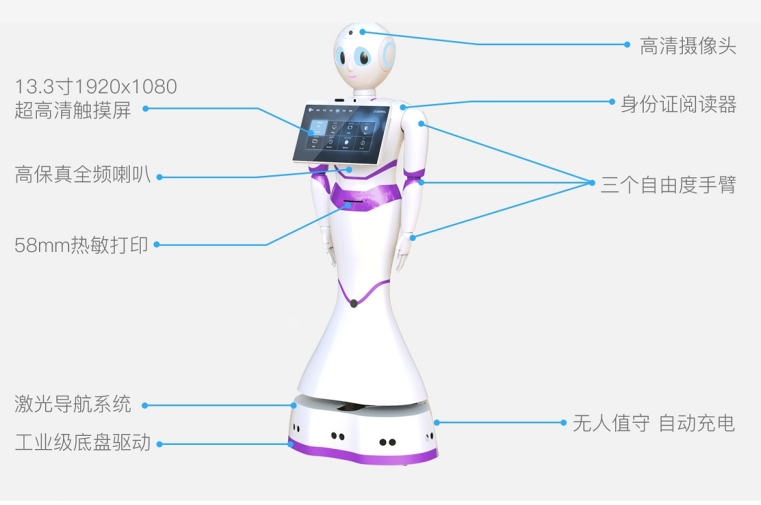
1 / 11Purchased a complete service robot with built-in Android SDK (navigation, LiDAR SLAM, face recognition, voice interaction exposed as API calls). 4-person team built upper-layer features: product introduction, ArcSoft face recognition check-in, iFlytek voice-guided tours, knowledge base. My role: Android interaction interface and robot SDK feature integration. Deployed at a building materials & decoration client exhibition hall (store fit-outs for brands like Apple, Huawei).
cm-level
Navigation
>90%
Voice Accuracy
>98%
Face Accuracy
7×24
Uptime
Problem
Exhibitions need interactive robots for guided tours, visitor check-in, and information queries. Building from scratch with ROS/SLAM would be too costly — needed a pragmatic SDK-based approach.
Solution
Purchased complete robot hardware + Android SDK, focused team effort on upper-layer features: ArcSoft face recognition for VIP check-in, iFlytek ASR/TTS voice interaction, multi-modal UI, knowledge base for product introductions, Spring Cloud backend for remote monitoring.
Architecture
Android touch UI → Robot Vendor SDK (SLAM/Navigation/Face/Voice APIs) → Spring Cloud backend → WebSocket/MQTT
Key Highlights
- ▸Integrated robot vendor SDK APIs for navigation, LiDAR map scanning, face recognition (ArcSoft), and voice (iFlytek ASR/TTS)
- ▸Built multi-modal interaction combining voice, touch, and vision in noisy exhibition environments
- ▸Implemented ArcSoft face recognition for VIP greeting, visitor check-in, and attendance tracking
- ▸Developed knowledge base integration for product introduction and information queries
Tech Stack
What I Learned
Buy-vs-build: purchasing a complete robot with SDK was the right call — let the team focus on upper-layer application value instead of low-level ROS/SLAM tuning. SDK integration skills are underrated but critical for real-world delivery.